見出しタグとは?
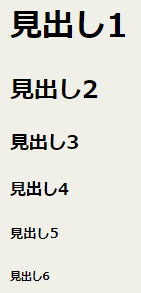 HTML見出しタグとは、WEBページ内の見出しを作るためのタグです。
<h1>見出し1</h1>

  <h2>見出し2</h2>

  <h3>見出し3</h3>

  <h4>見出し4</h4>

  <h5>見出し5</h5>

  <h6>見出し6</h6>
見出し<h1>~<h6>のデザイン
ここでは全てh2に指定してありますが、使うときはh1~h6に変更して使用してください。
色やサイズなど自由に変更してデザインしてください。
アンダーライン
【CSS】
h2 {
border-bottom: solid 3px red;
}
アンダーライン2
【CSS】
h2 {
border-bottom: solid 3px red;
text-align: center;
max-width: 400px;
margin-left: auto;
margin-right: auto;
}
上下にアンダーライン
【CSS】
h2 {
color: #3366cc;
padding: 0.5em 0;
border-top: solid 3px #3366cc;
border-bottom: solid 3px #3366cc;
}
上下にアンダーライン2
【CSS】
h2 {
color: #3366cc;
padding: 0.5em 0;
border-top: solid 3px #3366cc;
border-bottom: solid 3px #3366cc;
text-align: center;
max-width: 600px;
margin-left: auto;
margin-right: auto;
左にボーダー
【CSS】
h2 {
padding: .25em 0 .25em .75em;
border-left: 6px solid #669900;
}
左と下にボーダー
【CSS】
h2 {
padding: .25em 0 .5em .75em;
border-left: 6px solid #3366cc;
border-bottom: 1px solid #ccc;
}
ボーダーで囲んで角を丸くする
【CSS】
h2 {
padding: 5px 20px;
border: 1px solid #dc143c;
border-radius: 15px;
}
ボーダーで囲んで角を丸くする2
【CSS】
h2 {
padding: 5px 20px;
border: 1px solid #dc143c;
border-radius: 15px;
text-align: center;
max-width: 500px;
margin-left: auto;
margin-right: auto;
}
背景色を入れる
【CSS】
h2 {
padding: 5px 20px;
background-color: #cc3366;
color: #ffffff;
}
背景色と下にボーダーを入れる
【CSS】
h2 {
padding: 10px;
color: #364e96;
background: #eaf3ff;
border-bottom: solid 3px #516ab6;
}
文字が反射したように見える
【CSS】
h2 {
color: #2f4f4f;
line-height: 1.4;
-webkit-box-reflect: below -10px -webkit-linear-gradient(top,rgba(0,0,0,0),rgba(0,0,0,0) 10%,rgba(0, 0, 0, 0.6));
}
左縦マークと背景
【CSS】
h2{
position: relative;
color: white;
padding:0.3em 0.3em 0.3em 1.5em;
background-color: #b44c97;
border-radius: 5px;
}
h2::after {
position: absolute;
top: 50%;
left:0.7em;
transform:translateY(-50%);
content: '';
width: 5px;
height:30px;
background-color:#ff9900;
}
吹き出しを付けた見出し
【CSS】
h2{
position: relative;
padding: 0.3em 0.7em;
background: #007bbb;
color:#ffffff;
}
h2:after {
position: absolute;
content: '';
top: 100%;
left: 30px;
border: 15px solid transparent;
border-top: 15px solid #007bbb;
width: 0;
height: 0;
}
影をつけた見出し
【CSS】
h2 {
color: #fff;
font-size: 18px;
font-weight: bold;
background-color: #96514d;
box-shadow: 4px 4px 5px #a0a0a0;
padding: 6px 20px;
border-radius: 10px;
}
ドットラインの見出し
【CSS】
h2 {
padding: 1rem 1rem;
border-top: 4px dotted #6b8e23;
border-bottom: 4px dotted #6b8e23;
}
影をポップに
【CSS】
h2 {
position: relative;
padding: 7px 15px;
box-shadow: 5px 5px #212121;
border: 3px solid #212121;
border-radius: 10px;
background-color: #9acd32;
color: #212121;
font-size: 24px;
font-weight: bold;
text-align: center;
margin-bottom: 20px;
}
影をポップに 2
【CSS】
h2 {
padding: 7px 15px;
box-shadow: 0 7px #212121;
border: 3px solid #212121;
border-radius: 10px;
background-color:gold;
color: #212121;
font-size: 24px;
font-weight: bold;
text-align: center;
}
下のラインをななめ
【CSS】
h2 {
position: relative;
margin-bottom: 0.5rem;
padding-bottom: 0.5rem;
background-image: repeating-linear-gradient(45deg, transparent 0 3px, #a8c97f 3px 6px);
background-repeat: no-repeat;
background-size: 100% 0.5rem;
background-position: bottom;
font-weight: bold;
font-size: 24px;
color: #554738;
}
ラインを2本
【CSS】
h2 {
margin-bottom: 0.2rem;
padding: 0.2rem;
border-bottom: 10px double;
background-color:cornflowerblue;
color: white;
font-weight: bold;
font-size: 24px;
text-align: center;
}
左のラインを2色
【CSS】
h2 {
padding: 0.2rem 1rem 0.2rem 1.5rem;
margin-bottom: 0.2rem;
background-image:
linear-gradient(#24809A 50%, #f7bc33 50%);
background-repeat: no-repeat;
background-size: 0.5rem 100%;
font-weight: bold;
font-size: 24px;
}
下の線をななめ
【CSS】
h2 {
position: relative;
padding: 0.6rem 0.5rem;
margin-bottom: 0.5rem;
border-top: 3px solid #726250;
font-weight: bold;
font-size: 24px;
color: #5a544b;
text-align: center;
}
h2:before {
position: absolute;
top: 100%;
left: 0;
width: 100%;
height: 10px;
background-image: repeating-linear-gradient(45deg, #726250 0 2px, transparent 2px 4px);
content: '';
}
下のラインを2本
【CSS】
h2 {
position: relative;
padding: 0.6rem 0.5rem;
margin-bottom: 0.5rem;
border-top: 3px solid #5c9291;
border-bottom: 10px double #5c9291;
font-weight: bold;
font-size: 24px;
color: #2c4f54;
text-align: center;
}
同じページの同一見出しで色やラインなどを変える
【CSS】
h2 {
color: #252525;
border-bottom:double 6px orange;
}
同じページの同一見出しで色やラインなどを変える
わかりやすいクラス名を付ける(ここでは「bl」と付けました
【CSS】
h2.bl {
color: #007199;
border-bottom:solid 6px #00afcc;
}
h2タグの横に半角スペースとクラス名を入れる
【HTML】
<h2 class="bl">同一サイトの見出しで色やラインなどだけ変える</h2>